
Every setting, hook and table.
For administrators and developers.
All settings with their defaults, the screens and who may open them, the cron, the Perfex hooks and records the module uses, the database tables, and how to translate or change the module's texts.
01Settings
Setup > Settings (administrators). Each value is a Perfex option named catchline_<key>.
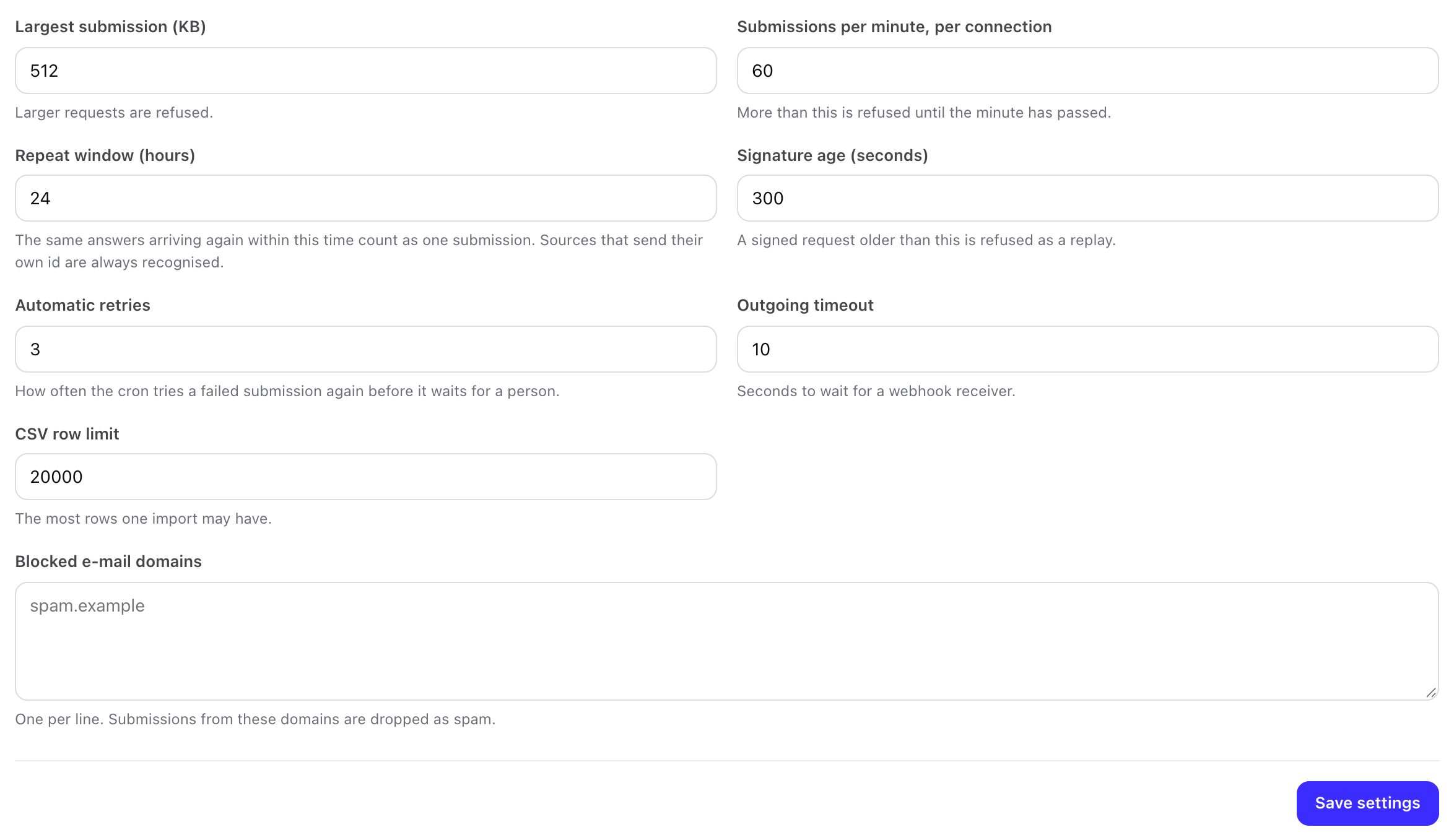
| Tab | Setting | Default | Range or values |
|---|---|---|---|
| Protection | Largest submission (KB) | 512 | 16 to 20,480 |
| Protection | Submissions per minute, per connection | 60 | 1 to 100,000 |
| Protection | Repeat window (hours) | 24 | 1 to 8,760 |
| Protection | Signature age (seconds) | 300 | 30 to 86,400 |
| Protection | Automatic retries | 3 | 0 to 10 |
| Protection | Outgoing timeout (seconds) | 10 | 3 to 30 |
| Protection | CSV row limit | 5,000 | 1 to 100,000 |
| Protection | Blocked e-mail domains | empty | one per line |
| Forms and spam | Posts per visitor per minute | 5 | 1 to 1,000 |
| Forms and spam | Posts per form per minute | 60 | 1 to 100,000 |
| Forms and spam | Keep partial answers for (days) | 30 | 0 to 3,650 |
| Forms and spam | Built forms: a returning visitor | Fill the existing record | create, fill, note, review queue |
| Forms and spam | Refuse throwaway e-mail addresses | on | |
| Forms and spam | Answer spam like a success | on | |
| Forms and spam | Ask for cookie consent first | off | |
| Forms and spam | Turnstile, hCaptcha, reCAPTCHA v2 site and secret keys | empty | secrets stored encrypted |
| Routing | Hot score | 75 | 1 to 100 |
| Routing | Behaviour half-life (days) | 30 | 0 (never fade) to 3,650 |
| Routing | First reply within (working minutes) | 15 | 1 to 10,080 |
| Routing | Remind after (minutes) | 10 | 0 (no reminder) to 10,080 |
| Routing | When the time runs out | Alert the owner | alert, give to the next person, alert a manager |
| Routing | Manager | Every administrator | a staff member |
| Routing | Claim time (minutes) | 15 | 1 to 1,440 |
| Routing | Team capacity (open new leads per person) | 0 (no limit) | 0 to 1,000 |
| Routing | Telegram bot token | empty | stored encrypted |
| Follow-up | Track opens and clicks | on | |
| Follow-up | Unsubscribe link text | "Unsubscribe" | up to 120 characters |
| Follow-up | E-mails per hour, all sequences | 0 (no limit) | 0 to 100,000 |
| Follow-up | Read replies of the last (days) | 1 | 1 to 30 |
| Attribution | Credit the lead to | The last source | last, first |
| Attribution | Remember the first visit for (days) | 90 | 1 to 365 |
| Attribution | Keep payloads for (days) | 30 | 0 (keep) to 3,650 |
| Attribution | Save the sender's IP address in the record note | off | |
| AI | Switch the AI helper on | off | |
| AI | Provider, model, API key, endpoint | Anthropic Claude, prefilled model, empty key | see Optional AI |
| AI | Requests per month / per staff member per day | 200 / 20 | 0 = no limit |
| AI | Apply message summaries without asking | off | |
| Reply mailboxes | IMAP mailboxes read for replies | none | see Reply mailboxes |
| Privacy | Export, erase, remove old payloads now | see Privacy |
The Meta and Google settings are on Setup > Conversions (Conversions), among them Send conversions to Meta only for leads that gave marketing consent (on by default). The Spam and A/B settings of each form are in the form builder.
02Screens and who may open them
| Menu | Screens | Permission |
|---|---|---|
| Dashboard | Key numbers, submissions per day, hot leads, top sources, latest failures | View |
| Forms | Forms list and builder | View (look and preview), Create, Edit, Delete |
| Leads and sources | Submissions, review queue, lead panel; Sources, CSV import | View, plus Create / Edit / Delete for changes |
| Claim leads | Open offers and your claims | Claim leads offered to a pool |
| Follow-up | Sequences | View, plus Create / Edit / Delete |
| Reports | Overview, funnel, sources, campaigns, A/B tests, speed to lead, ad costs | View; Edit and Delete for ad costs |
| Setup | Getting started, scoring and routing, sales team | View, plus Edit for changes |
| Setup | Conversions, outgoing webhooks, settings, system check, sample data | Administrators |
| AI queue (when AI is on) | Ask the AI, proposals, audit log | View; Create / Edit to ask and decide |
Details per permission: Staff permissions.
03Cron
The module registers one task with the Perfex cron (register_cron_task, or the after_cron_run hook on Perfex versions without it). The steps and their order: retries, payload clean-up, AI summaries, lead watcher, reply timers, claim expiry, sequences, reply mailboxes, outgoing webhooks, Meta conversions, score decay, unfinished answers clean-up, Lead Ads retries, visit counter clean-up. One failing step does not stop the others; errors go to the log prefixed [catchline]. The time of the last run is the option catchline_cron_last_run.
04Perfex hooks and records
Hooks the module listens to: admin_init (permissions and menu), app_admin_head and app_admin_footer (its CSS and JavaScript on its own pages, and the Catchline button on the Perfex lead page), the filter module_catchline_action_links (links in Setup > Modules), the cron task above, and the filter steward_ai_register_tools (tools for the separate Steward AI module). The bundled MIKODES Perfex Kit prints its own CSS and JavaScript once per page through app_admin_head and app_admin_footer. The module fires no hooks of its own.
Perfex records it writes, always through Perfex's own models so Perfex's hooks and notifications run: leads (leads_model), customers and contacts (clients_model, without the welcome e-mail), tickets (tickets_model), notes (misc_model), tasks (tasks_model), staff notifications (add_notification), custom field values, tags, and lead attachments (Perfex's lead upload folder and files table). E-mails go through Perfex's e-mail library and settings.
Perfex data it reads: leads and their statuses, sources and activity log, customers, contacts, staff, custom fields, tags, countries, currencies and invoices (for revenue and conversion values).
05Database tables
35 tables with your Perfex table prefix, created on activation and removed on uninstall: cl_connections, cl_rules, cl_submissions, cl_review_queue, cl_round_robin, cl_ai_actions, cl_audit, cl_forms, cl_form_versions, cl_variants, cl_placements, cl_partials, cl_files, cl_consents, cl_score_rules, cl_scores, cl_score_events, cl_staff_prefs, cl_claims, cl_speed, cl_lead_watch, cl_route_turns, cl_lead_meta, cl_sequences, cl_sequence_steps, cl_enrollments, cl_email_events, cl_suppressions, cl_reply_mailboxes, cl_outgoing_hooks, cl_hook_deliveries, cl_conversions, cl_campaign_costs, cl_stats_daily, cl_stats_hits. No Perfex table is altered.
06Languages
The module ships English only, in four files under modules/catchline/language/english/: catchline_lang.php, catchline_builder_lang.php, catchline_admin_lang.php and catchline_reports_lang.php. Every key starts with cl_ (or is catchline).
- Translate: copy the four files into
modules/catchline/language/<language>/(the folder name Perfex uses for that language, for examplegerman) and translate the values. Keep the%sand{1}placeholders. Staff then see the module in their Perfex language. - Change a few texts: add the keys you want to change to Perfex's
custom_lang.phpfor that language, as Perfex describes for its own texts. Updates of the module do not overwrite it. - Public forms: the buttons and error messages of public forms are the
cl_public_*andcl_field_err_*keys. A form with more than one language can also translate them per language on its Languages tab (see Languages of the public form).
Back up your translated files before an update: the module folder is replaced on update.
07Files and folders
| Path | What |
|---|---|
modules/catchline/ | The module (replaced on update) |
modules/catchline/config/csrf_exclude_uris.php | The public posting addresses |
uploads/catchline-private/<submission>/ | Files uploaded through forms |
uploads/catchline-private/import/ | CSV files between preview and import (deleted after a day) |