
Know what is kept.
Remove it on time and on request.
What Catchline stores and for how long, how IP addresses and secrets are protected, and how to export or erase what the module logged about one e-mail address.
01What Catchline stores
Catchline keeps its data in its own 35 tables in your Perfex database (with your table prefix) and uploaded files in uploads/catchline-private/. The leads, customers, contacts, tickets, notes and tasks it creates are ordinary Perfex records.
| Data | Where | How long |
|---|---|---|
| Submissions: the raw payload, the field values, the e-mail address, a fingerprint of the sender's IP address | Submission log | Until the retention period, then removed; the log line (time, status, record created) stays |
| Uploaded files | uploads/catchline-private/, and a copy on the Perfex lead | Catchline's copy with its submission; the Perfex copy until you delete it in Perfex |
| Consent records: e-mail, the text shown, its version, time, IP fingerprint | Consent table | Kept as proof until erased |
| Unfinished answers (only when switched on for a form) | Partials table | Keep partial answers for, default 30 days after the last change |
| Source and campaign of a lead: UTM values, click ids, landing page, referrer, first touch | Attribution table, by Perfex lead id | Kept for the reports and the conversion loops; removed by Erase |
| Scores, reply timers, claims | Module tables, by Perfex lead id | Kept |
| Sequence enrolments (with the e-mail address), sent, open and click events | Follow-up tables, by Perfex lead id | Kept; removed by Erase |
| Unsubscribed e-mail addresses | Unsubscribe list | Kept, so the address is never e-mailed again |
| Conversion events: event, time, click id, hashed contact data | Conversion log | After the retention period the click id and the hashed data of finished events are removed, the line stays; removed by Erase |
Outgoing webhook deliveries with their payload (for lead.captured, the answers) | Delivery log | The payload until the retention period (a delivery still waiting then is marked failed), the line until you delete the webhook; removed by Erase |
| Visit counters (a hashed visitor id per form and day) | Counters table | Removed daily |
| AI proposals and the AI audit log | AI tables | Kept; proposals tied to a submission go with its payload |
What the forms keep in the visitor's browser is listed under Publish and embed.
02Retention
Settings > Attribution > Keep payloads for (default 30 days; 0 keeps them until you delete them). After that period the cron removes the payload, the field values, the e-mail address and the IP fingerprint of each submission, deletes its uploaded files in Catchline's storage and its AI proposals, and closes review items nobody decided. It also removes the payloads of older outgoing webhook deliveries and the click id and hashed contact data of older finished conversion events. Settings > Privacy > Remove old payloads now does the same at once.
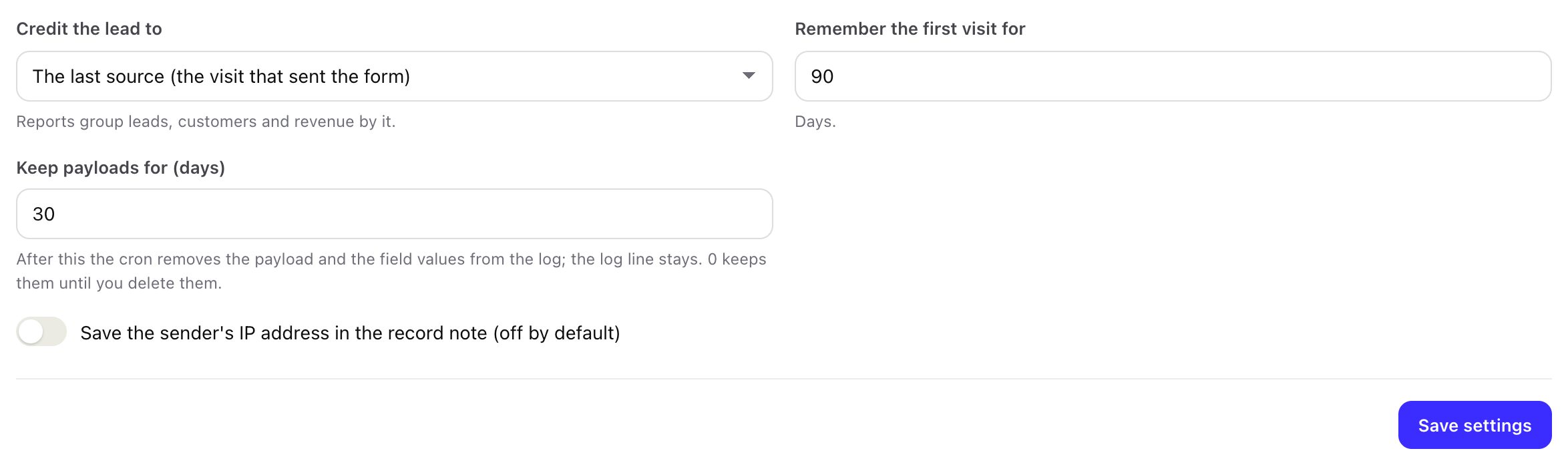
A longer period keeps more personal data; a shorter one means failed submissions can no longer be replayed. Click ids for the conversion loops are kept with the lead's source record, so late customers still reach Google and Meta (see Conversions). Choose a period that fits your needs and say it in your privacy notice.
03IP addresses
Catchline stores only a fingerprint of the sender's IP address (an HMAC with your install's own secret), used for rate limits and consent records. The address itself is stored, in the submission and in the note on the record, only when you switch on Settings > Attribution > Save the sender's IP address in the record note (off by default).
04Export or erase by e-mail
Under Settings > Privacy (administrators) type an e-mail address:
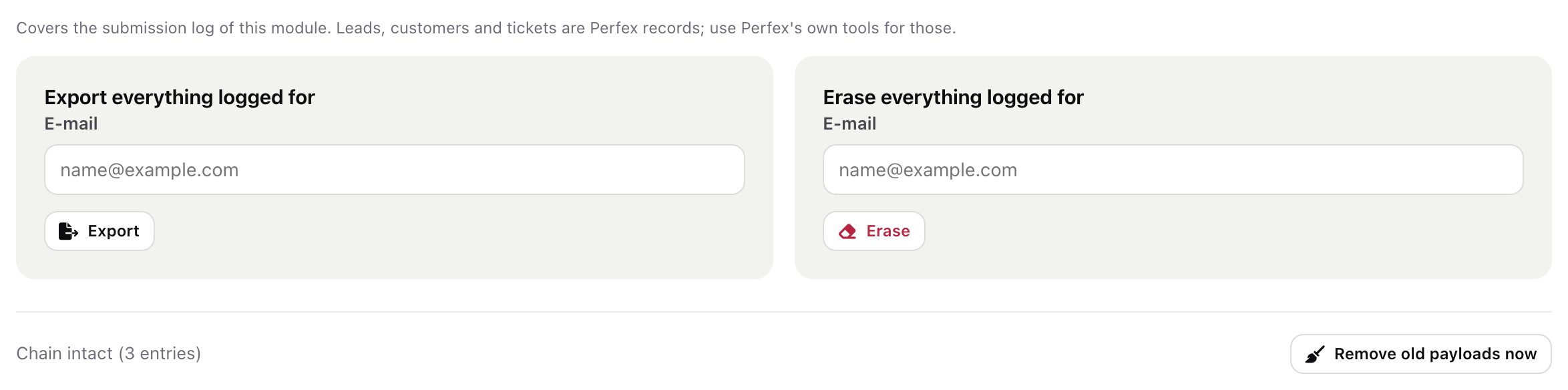
- Export downloads
catchline-export.jsonwith two parts:submissions(each submission's id, source, time received, status, the record it created, the field values and the raw payload) andunfinished_answers(form id, step, answers, created and updated times). - Erase deletes that address's submissions with their uploaded files, its consent records and its unfinished answers, and what Catchline keeps about the person's leads (the leads of those submissions, Perfex leads with that address and leads that got follow-up at that address): the source record (attribution), follow-up enrolments with their sent, open and click events, conversion events, and the stored outgoing webhook deliveries about those submissions or leads. The reports no longer count those leads. It cannot be undone.
Both are written to the module's audit log with a fingerprint of the address, not the address itself.
The Perfex lead, customer, contact or ticket and the files attached to them: use Perfex's own GDPR tools. The lead's score, reply timer and claim stay (they hold no answers). The address stays on the unsubscribe list if it unsubscribed, so it is never e-mailed again. Data already sent to Meta, Google, webhook receivers or an AI provider is subject to their own deletion processes.
05Secrets and encryption
Signing secrets, the Lead Ads App Secret and Page token, the Meta Conversions API token, the Google feed token, captcha secret keys, the Telegram bot token, the AI key, reply mailbox passwords and outgoing webhook secrets are stored encrypted with Perfex's (CodeIgniter's) encryption library and the encryption_key of your install in application/config/app-config.php, the way Perfex stores its own SMTP password. Screens never show a saved secret again. The secret part of each source's webhook link is not stored at all, only its fingerprint.
Keep application/config/app-config.php in your backups with the database. If the encryption key changes, saved secrets can no longer be read: enter them again (the System check's Encryption row tests the key).
06What leaves your server
Only to the services you connect, with your own accounts: Meta (Graph API for leads and conversions), Google (the conversion file Google fetches; reCAPTCHA if chosen), Cloudflare Turnstile or hCaptcha if chosen, Telegram if you saved a bot token, your outgoing webhook receivers, your reply mailboxes, and the AI provider when the AI helper is on. Nothing is sent to the author of the module, and the module has no licence check or usage reporting.