Tell your ads which leads were real.
Meta Conversions API and Google Ads uploads.
When a captured lead reaches a status you choose or becomes a customer, Catchline sends an event to your Meta pixel and lists the conversion in a file Google Ads fetches on a schedule. What is sent, how to set it up, and what to check for privacy.
01What this does
Ad platforms learn from the leads that turn into customers. Setup > Conversions (administrators) connects two loops:
- Meta Conversions API: an event to your Meta pixel (dataset) when a lead Catchline captured reaches a lead status you mapped to an event, and when it becomes a customer.
- Google Ads offline conversions: a secret CSV link that Google Ads reads on a schedule, listing leads that came with a Google click id (
gclid) and became customers.
Status changes and conversions are noticed on the cron; events are sent from the cron with retries. Only leads Catchline captured are considered.
02Meta Conversions API
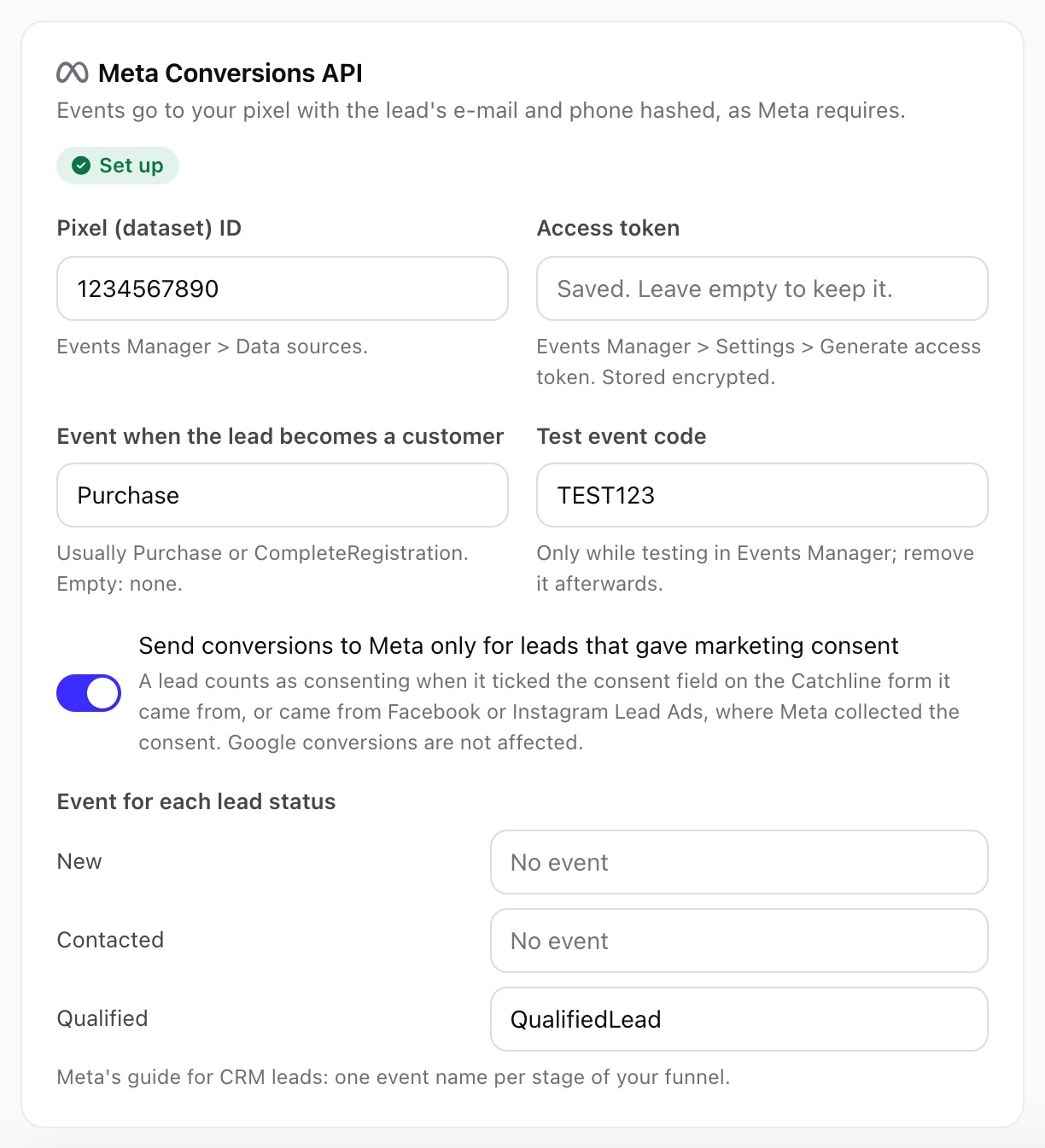
- Pixel (dataset) ID: from Meta Events Manager > Data sources.
- Access token: Events Manager > Settings > Generate access token. Stored encrypted; a blank field keeps the saved one.
- Event when the lead becomes a customer: usually
PurchaseorCompleteRegistration. Empty: none. - Event for each lead status: one event name per stage of your funnel, for example
QualifiedLeadfor your "Qualified" status, as Meta's guide for CRM leads describes. Statuses without an event send nothing. - Test event code (optional): only while you test in Events Manager. Remove it afterwards.
- Send conversions to Meta only for leads that gave marketing consent (on by default): see Consent below.
Each event is sent once per lead and event name, one event per request, from the cron. A failed event is tried again after 5, 30, 120 and 360 minutes. Meta refuses events older than 7 days, so an event not sent within 7 days is marked failed.
03What is sent to Meta
| Data | Form |
|---|---|
| Event name, time and an event id (for Meta's deduplication) | Plain |
action_source system_generated, event_source crm, lead_event_source "Perfex CRM" | Plain |
| The lead's e-mail, phone (only with a country code), first name, last name, city and country from the Perfex lead | SHA-256 hashes after Meta's normalisation |
| The Meta lead id, for leads from Lead Ads | Plain, as Meta asks |
fbc (the _fbc cookie, or built from the fbclid of the visit) and fbp (the _fbp cookie), when the form captured them (with Ask for cookie consent first on, only after the visitor's consent; see Publish and embed) | Plain, as Meta asks |
The request goes to graph.facebook.com (Graph API v27.0) with your access token. Nothing else about the lead (answers, notes, files) is sent.
04Consent
With Send conversions to Meta only for leads that gave marketing consent switched on (the default), Catchline sends an event only for a lead that:
- ticked the consent box on a Catchline form whose submission became this lead (a consent typed with the same e-mail address on another form does not count, because anyone can type an address; see Consent), or
- came from Facebook or Instagram Lead Ads, where Meta's own form collected the consent.
Leads from other sources (form tools, Google Ads, CSV import) have no consent record in Catchline, so they are not sent to Meta while the switch is on. Switch it off only if your privacy notice and legal basis cover sending hashed contact data to Meta for every lead. Google conversions are not affected by this switch: the Google file lists leads by their click id only.
05Google Ads offline conversions
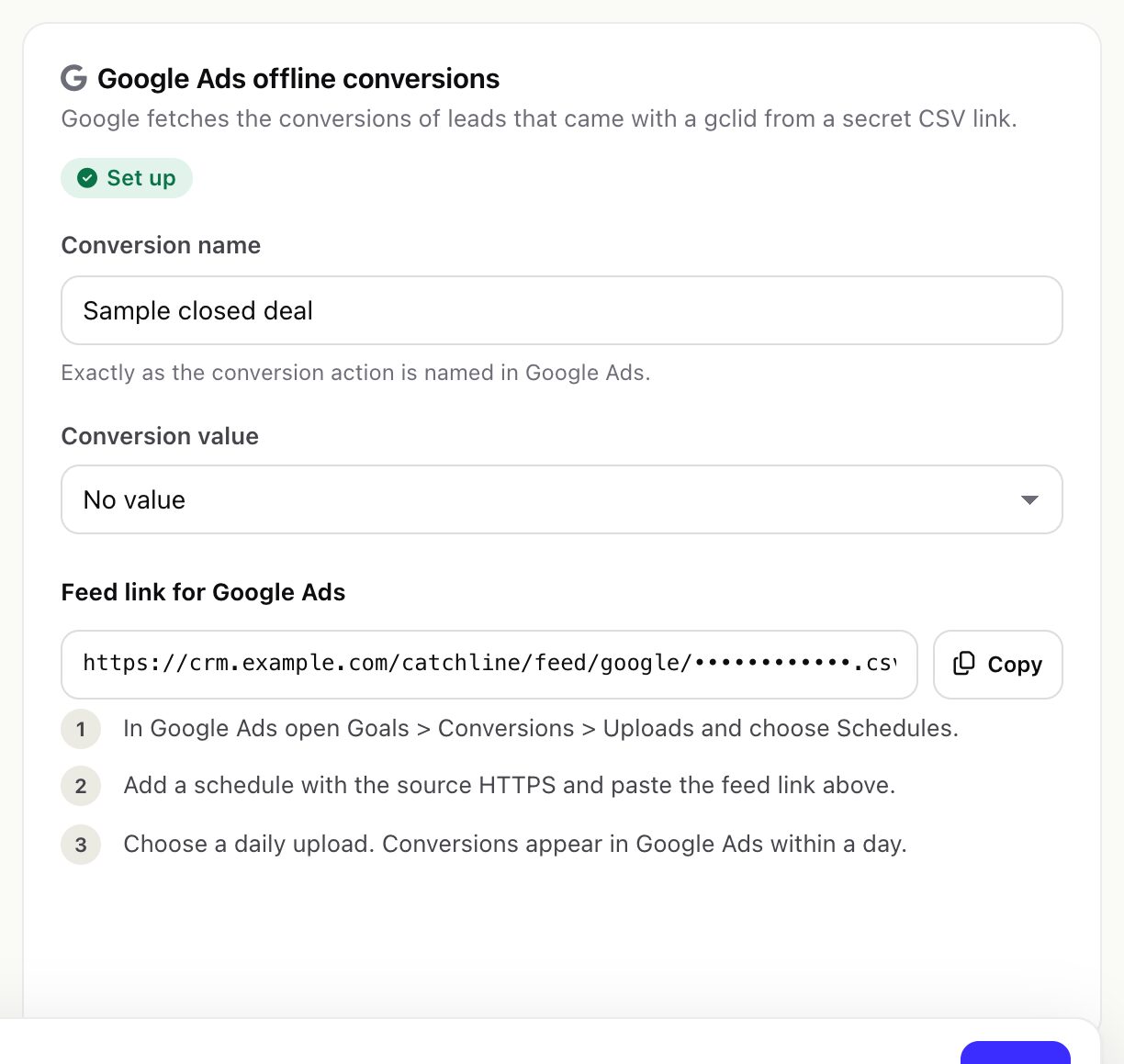
- Conversion name: exactly as the conversion action is named in Google Ads.
- Conversion value: no value, or the customer's first paid invoice (see the note below).
- Save. The first save creates the feed link,
https://crm.example.com/catchline/feed/google/<secret>.csv. - In Google Ads open Goals > Conversions > Uploads, choose Schedules, add a schedule with the source HTTPS, paste the feed link and choose a daily upload. See Google: import offline conversions.
The file follows Google's template: a first line Parameters:TimeZone=+0000, then Google Click ID, Conversion Name, Conversion Time, Conversion Value, Conversion Currency, one row per lead with a gclid that became a customer in the last 90 days. Text that looks like a spreadsheet formula is neutralised. Make a new feed link replaces the link at once; update it in Google Ads.
- Only the
gclidis used. Leads that came withgbraidorwbraidonly are not listed. - If Google's schedule form asks for a user name and password, Catchline does not check them: the secret link is the protection. This was not tried with a live Google Ads account.
- Google labels file imports as a legacy method and recommends its Data Manager. Check Google's current page before you rely on scheduled uploads.
With The customer's first paid invoice, the value is the total of the customer's earliest invoice with the Perfex status Paid, in that invoice's currency. Unpaid, partly paid, overdue, cancelled and draft invoices do not count. A conversion is listed only once its customer has a paid invoice.
06Click ids and the retention period
Catchline reads the gclid, fbclid and Meta cookies of a lead from the lead's source record (the attribution kept for the reports), not from the submission's payload. The retention setting (Settings > Attribution > Keep payloads for, default 30 days) removes payloads but not this record, so a lead that becomes a customer months later is still listed for Google with its gclid and sent to Meta with its click data.
The same retention period also cleans the conversion log: for events older than the period that were sent, listed or failed, the hashed contact data and the click id are removed. The line itself (platform, lead, event, time, status) stays, so the same event is never sent twice. Google reads the last 90 days of the file; with a retention period shorter than that, a conversion leaves the file once its click id is removed, after Google's daily schedule has read it.
07Sent conversions
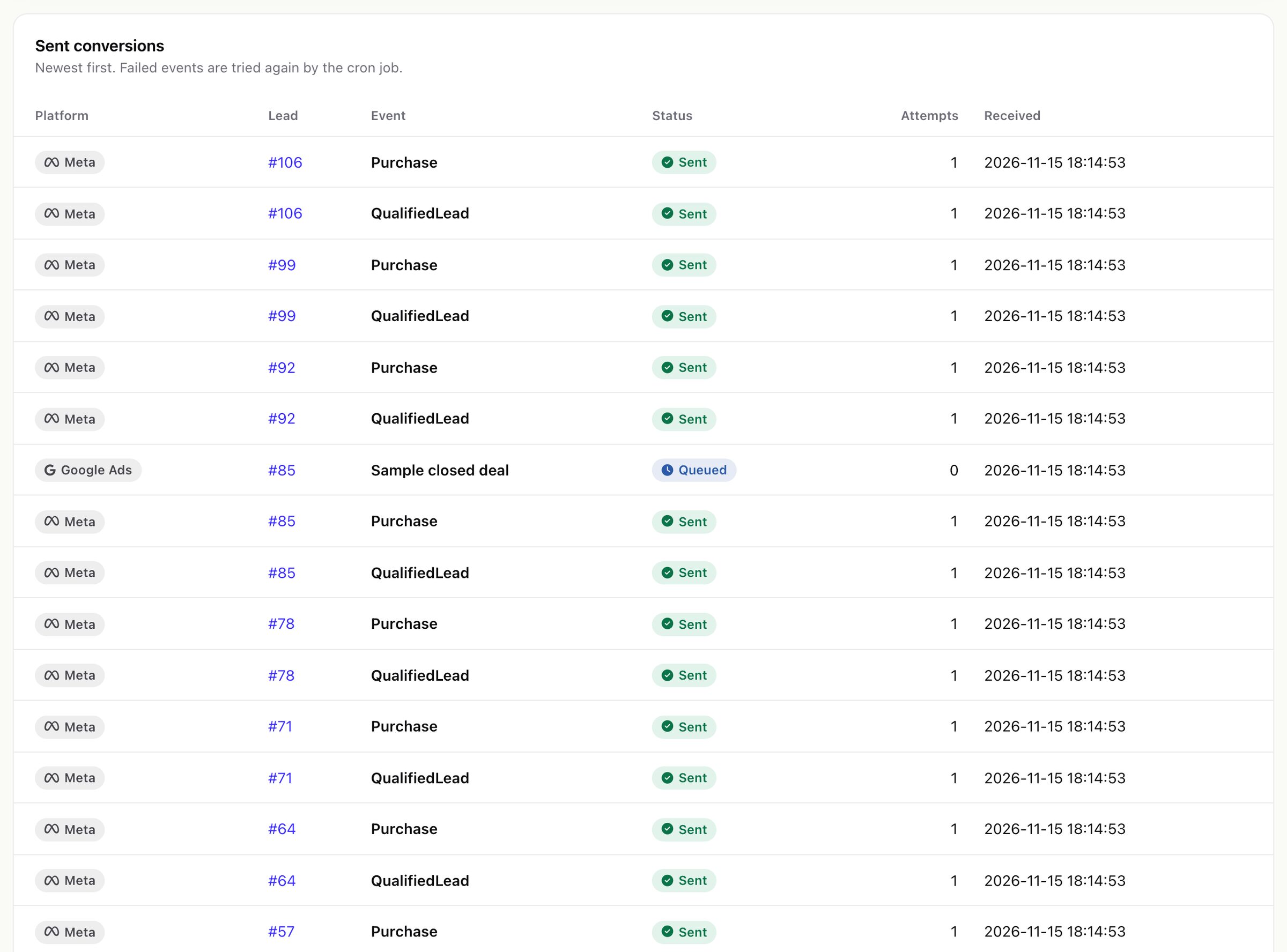
The Sent conversions list shows each event, newest first: platform, lead, event, status (queued, will retry, sent, in the feed, failed), attempts and time. The hashed customer data is not shown.